
Ever dreamt of sharing your voice with the world, building a community, or even carving out a new income stream? Starting a blog in 2025 isn’t just a possibility; it’s a proven path to digital influence and financial freedom. Millions have embarked on this journey, transforming their passions into powerful online platforms. Perhaps you’re thinking it’s too complex, or that your unique perspective won’t find an audience. Let me tell you, you’re not alone in those thoughts. I’ve been there, and what began as a simple idea has blossomed into a significant source of passive income. The digital landscape of 2025 offers more opportunities than ever before for aspiring bloggers.
This comprehensive, step-by-step guide is designed to demystify the process, showing you exactly how to launch the most robust and popular type of blog: a self-hosted WordPress site. We’ll navigate the essentials, from pinpointing your perfect niche to optimizing your content for the modern web. Ready to turn your dreams into reality? Let’s dive in and build something remarkable together.
Understanding the Digital Landscape: Why Blog Now?
In an era dominated by fleeting social media trends, blogging stands as a beacon of authentic, long-form content. It’s not just a hobby; it’s a strategic move into one of the most profitable online ventures with surprisingly low startup costs. You might be brimming with questions: How can I build a truly profitable blog? What should my focus be? And how does one actually turn words into revenue?
Let’s cut through the noise and address the foundational questions every budding digital storyteller asks:
What exactly is a blog ?
At its core, a blog remains a dynamic, frequently updated website, a digital canvas for sharing insights, stories, and expertise on a specific subject. Whether run by an individual or a small collective, its purpose is timeless: to inform, educate, and entertain, fostering a loyal audience that eagerly anticipates your next piece. It’s your personal broadcasting station, connecting your ideas, experiences, and unique perspectives with a global audience.
Why should you embark on this blogging journey?
Even if your initial impulse is to blog purely for passion, consider the ripple effect. There’s always someone, somewhere, seeking the very knowledge you possess. Imagine you’re a culinary enthusiast, a maestro of unique recipes and kitchen hacks. When someone searches for
“easy dinner recipes” or “how to bake sourdough at home,” your blog could be the guiding light. A blog allows you to share your culinary wisdom, cultivate a vibrant community around your passion, and yes, even monetize your content. It’s about investing your time in something meaningful, something that resonates far beyond your screen.
Do I need to be a tech wizard to start a blog?
Absolutely not. The beauty of modern blogging, especially with platforms like WordPress, is its accessibility. You don’t need to write a single line of code to build a stunning, functional blog. While a curious mind and a willingness to learn new skills are always beneficial, this guide is crafted specifically for beginners. We’ll leverage user-friendly tools and platforms that empower you to create a popular WordPress blog, even if your technical experience is currently zero.
What about my writing skills? Do I need to be a literary genius?
Think of blogging as a conversation, not a formal essay. It’s about authenticity, sharing your unique perspective, and forging a connection with your audience. Just like learning to ride a bike, you won’t be perfect from day one, but practice refines skill. Focus on clarity, genuine expression, and providing value. Your voice is your most powerful asset; let it shine through.
Can a blog actually make money in 2025?
Unequivocally, yes. If your blog genuinely addresses the needs and desires of your audience, the opportunities for monetization are vast. The key is helpful, high-quality content. From affiliate marketing and sponsored posts to selling digital products (like e-books or courses) and physical goods, the avenues are diverse. As your influence grows, advertisers may even seek you out, a testament to the value you’ve built. We’ll delve deeper into these strategies later.
What’s the financial commitment to start a blog?
While free blogging options exist, they often come with significant limitations, hindering your ability to truly monetize and scale. The self-hosted WordPress blog we’re focusing on offers unparalleled control and potential. The good news? The initial investment is remarkably low. This guide is designed to minimize your costs, with basic expenses for your first year typically ranging from 24to24 to 24to50. That’s less than your monthly coffee budget for a year of digital empowerment. Sounds like a smart investment, doesn’t it? Let’s get started!
Step 1: Pick Your Niche – The Heartbeat of Your Blog
Before you write your first word, you need to define your blog’s purpose. If you’re representing a business or organization, your blog topics should naturally align with your products or services, serving as a powerful content marketing arm. For individual bloggers, this is where you discover your “Blog Niche”the specific topic that will define your digital space. Think of it as your unique corner of the internet, whether it’s sustainable living, advanced AI ethics, gourmet vegan cooking, or anything that ignites your curiosity.
To pinpoint your perfect niche, ask yourself two crucial questions:
1.How deeply passionate are you about this topic? Your enthusiasm will be the fuel that sustains your blogging journey, especially through the initial stages.
2.How much interest does your target audience have in this topic? A niche, no matter how personally compelling, needs an audience to thrive. It’s the intersection of your passion and market demand.
In essence, if you possess a genuine passion for a subject, coupled with relevant skills or experiences, you’re on the right track. For instance, if you’re a seasoned chef or a home cook with a flair for innovative dishes, a food blog could be your culinary canvas. You’d share not just recipes, but the stories behind them, the techniques that elevate a dish, and perhaps even the cultural context of ingredients. Understanding your readers’ preferences be it quick weeknight meals or elaborate weekend feasts allows you to craft content that keeps them engaged and craving more.
Consider these popular and evergreen blog topics that continue to resonate in 2025:
•Sustainable Living & Eco-Friendly Practices
•AI & Emerging Technologies
•Mental Wellness & Digital Detox
•Personal Finance & Investing for the Modern Age
•Remote Work & Digital Nomad Lifestyles
•DIY & Smart Home Innovations
•Health & Biohacking
•Travel & Experiential Tourism
•Creative Arts & Digital Design
•Parenting in the Digital Age
Don’t overthink it. The most successful blogs often evolve. Choose a topic that excites you, and let your journey of learning and sharing begin. Your unique perspective is what will set you apart.
Step 2: Choose Your Digital Stage Selecting a Blogging Platform
Think of your blogging platform as the central hub of your digital operation the sophisticated control center where all your content is managed and presented. Just as a chef needs a well-equipped kitchen to create culinary masterpieces, you need a robust and reliable platform to craft and deliver your blog posts to the world.
The digital landscape offers a variety of blogging platforms, each with its own strengths and limitations. Some prioritize ease of use, while others offer unparalleled customization but might require a steeper learning curve or a more significant investment for advanced features. In the vast universe of blogging, one platform reigns supreme: WordPress.
Why WordPress? The Unrivaled Champion of Blogging
WordPress is not just popular; it’s ubiquitous. As the world’s leading Content Management System (CMS), it powers over 43% of all websites globally, from individual blogs to corporate giants. Its dominance stems from a powerful combination of factors:
•Open-Source and Free: The core WordPress software is completely free to use, offering incredible flexibility and control.
•Unmatched Customization: With thousands of themes and plugins, you can tailor your blog’s appearance and functionality to your exact specifications, without needing to write a single line of code.
•Scalability: Whether you’re starting small or aiming for a global audience, WordPress can grow with you.
•Community Support: A massive, active community means abundant resources, tutorials, and support whenever you need it.
This very blog you’re reading is built on WordPress, a testament to its capabilities. While WordPress itself is free, to unlock its full potential especially for a profitable, self-hosted blog you’ll need a web host. This brings us to the next crucial step.
Step 3 & 4: Securing Your Digital Home Web Hosting and Initial Setup
Let’s revisit our restaurant analogy. If WordPress is your state-of-the-art kitchen, then your web hosting service is the dining area the essential space that makes your culinary creations accessible to your eager customers. In the digital realm, a web host provides the server space that makes your blog live and visible on the internet.
In essence:
•The Blogging Platform (WordPress): Manages all your content posts, media, design elements, and everything that makes your blog your blog (your digital kitchen).
•The Web Host: Provides the digital real estate and infrastructure to deliver your blog to readers worldwide, ensuring it’s always accessible and performs optimally (your digital dining area).
For beginners, choosing the right web host is paramount. You need a service that simplifies the technical complexities, allowing you to focus on content creation. This is where Bluehost shines. As one of the most recommended hosts by WordPress itself, Bluehost has a long-standing reputation for reliability and user-friendliness, powering millions of websites globally. Their intuitive setup process makes launching your WordPress blog remarkably straightforward, often taking less than 30 minutes.
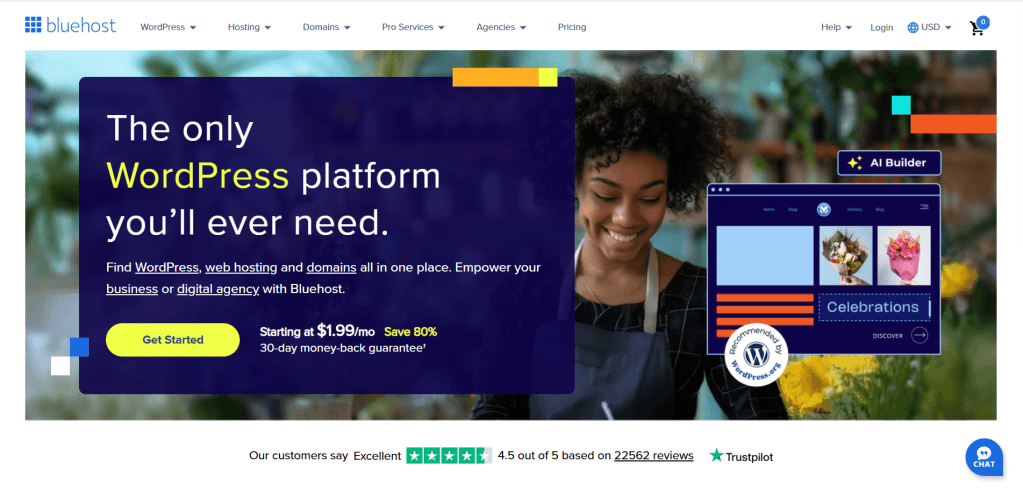
Why Bluehost is a Smart Choice for New Bloggers in 2025:
Bluehost offers a compelling package designed to get new bloggers online without unnecessary hurdles:
•Free Domain Name for the First Year: A significant saving, as your domain is your blog’s unique address (e.g., yourblogname.com).
•Free SSL Certificate Included: Essential for security and SEO. An SSL certificate encrypts data between your site and visitors, building trust and improving search rankings. Think of it as sending your content in a securely locked, tamper-proof digital envelope.
•One-Click WordPress Installation: No complex coding or manual setup required. Bluehost automates the WordPress installation process.
•SSD Web Storage: Ensures faster loading times for your blog, a critical factor for user experience and SEO in 2025.
•24/7 Expert Support: Help is always available, whether you’re troubleshooting or seeking guidance.
•30-Day Money-Back Guarantee: A risk-free way to try their service.
Setting Up Your Blog with Bluehost: A Step-by-Step Walkthrough
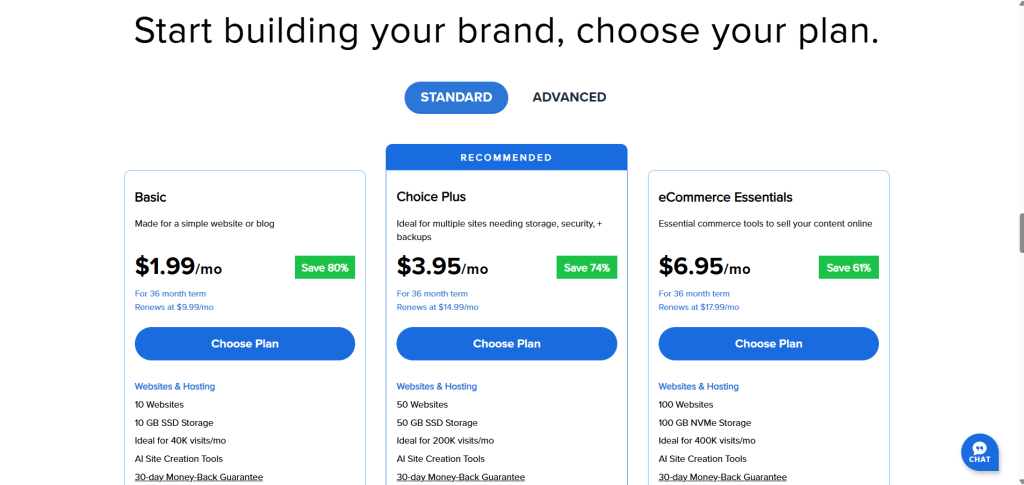
1.Head to Bluehost: Click here to visit Bluehost and select the “Get Started” button. You’ll be presented with various hosting packages. For beginners, the basic package is often sufficient, offering all the essentials. You can always upgrade later as your blog grows.
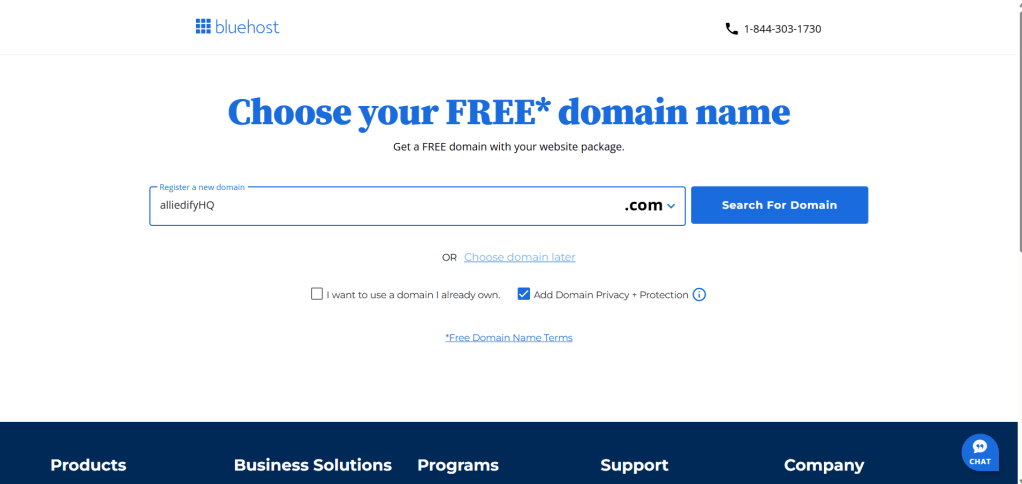
2.Choose Your Domain: This is your blog’s identity. Select a name that’s short, memorable, and relevant to your niche. Bluehost provides a free domain for your first year. If your preferred name isn’t available, try variations or choose to select it later.
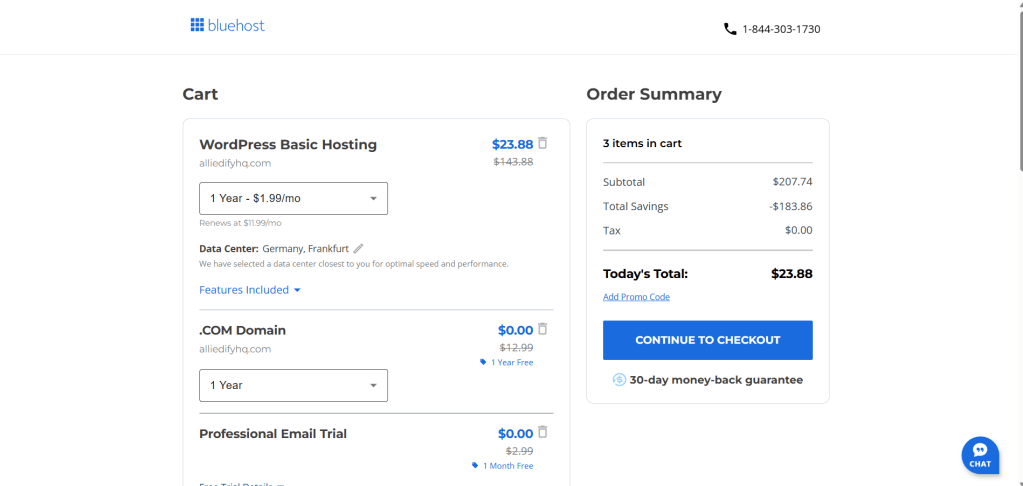
3.Complete Your Purchase: Bluehost offers flexible payment terms, typically 12 or 36 months upfront. Opting for a longer term often reduces your monthly cost. For instance, a 1-year upfront payment can bring your yearly expenses down significantly. Be mindful of pre-selected add-ons.
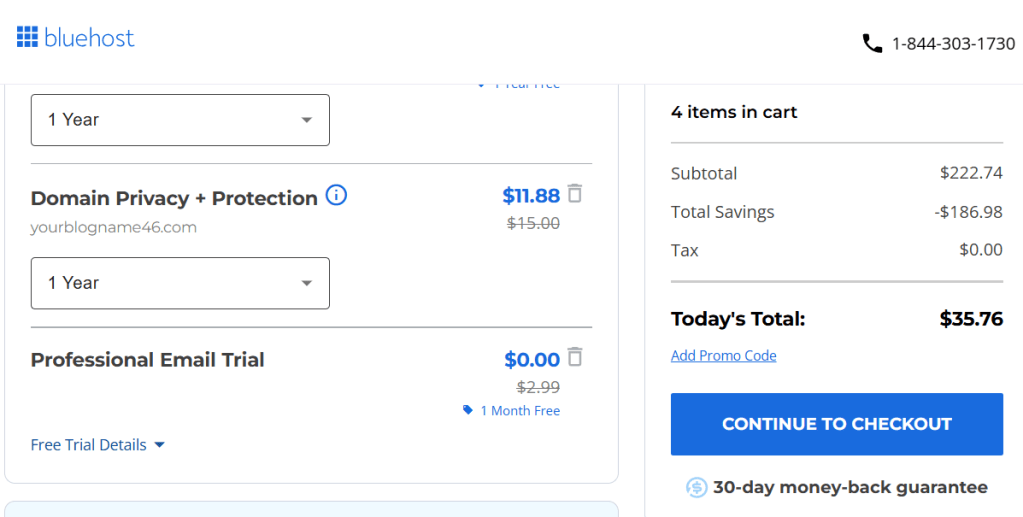
While “Domain Privacy Protection” is recommended (it keeps your personal information private in public domain registries), other options might not be necessary for a new blogger. Uncheck anything you don’t need to keep costs low.
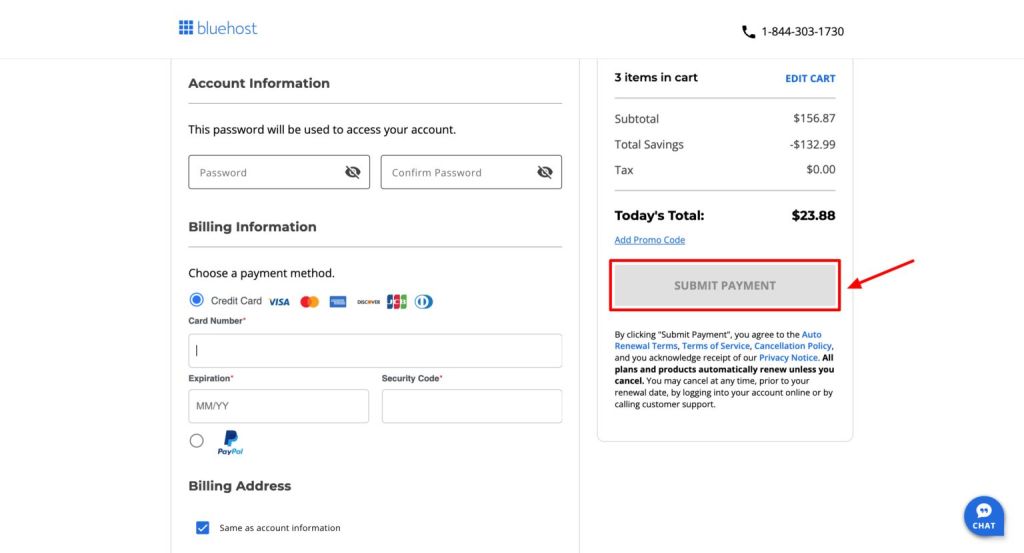
4.Finalize and Install: After payment, Bluehost will guide you through setting up your account and installing WordPress. This process is largely automated. You’ll create a Bluehost account password and receive your WordPress login details via email. Keep these safe!
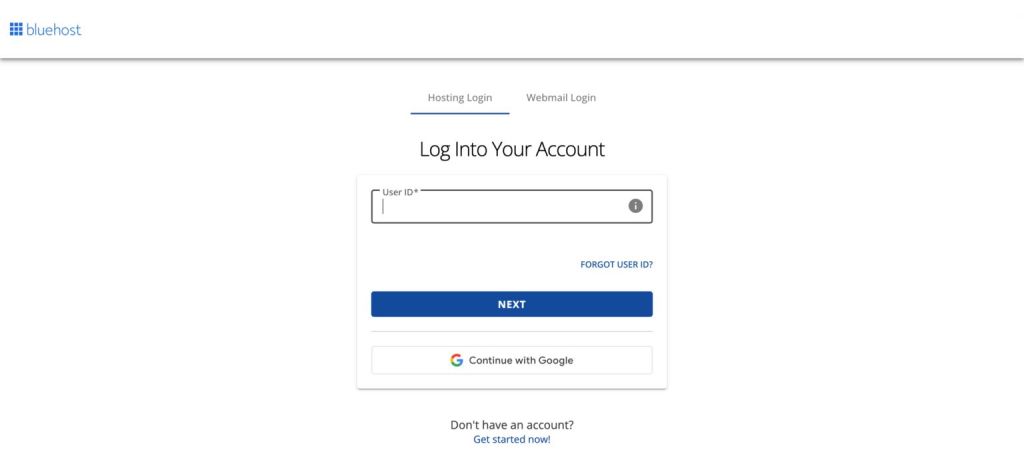
If you encounter any issues, Bluehost’s support team and extensive knowledge base are invaluable resources. Don’t hesitate to reach out.
With these steps, you’ve secured your blog’s foundation. Now, let’s dive into the heart of your digital presence: WordPress itself.
Step 5: Getting Started with WordPress
Welcome to the nerve center of your blog! You’ve successfully laid the groundwork, and now it’s time to truly inhabit your digital space. Remember, you’ll be juggling two sets of login credentials:
•Bluehost Login: This is for managing your hosting account, billing, and server settings. Think of it as the keys to your digital property.
•WordPress Login: This is your daily access pass to the WordPress admin area, where the magic happens crafting posts, managing content, and shaping your blog’s identity. This is your creative studio.
Your welcome email from Bluehost is a treasure trove of information, containing everything you need to log into your WordPress dashboard. For daily operations, you’ll primarily use your WordPress username and password to access yourdomain.com/wp-admin.
Navigating the WordPress Dashboard: Your Creative Hub
At first glance, the WordPress dashboard might seem like a complex cockpit, but it’s surprisingly intuitive. This is where you’ll:
•Create and Publish Content: Write compelling blog posts, upload stunning images, and organize your digital narratives.
•Manage Media: A central library for all your images, videos, and other assets.
•Enhance Functionality with Plugins: Add powerful features to your blog without any coding. Plugins are like apps for your website, extending its capabilities.
•Customize Appearance: Tweak your blog’s design, layout, and visual elements.
To access your WordPress site through Bluehost, simply log into your Bluehost account, navigate to “My Sites,” and select your WordPress installation. Alternatively, direct access via yourdomain.com/wp-admin is often the quickest route.
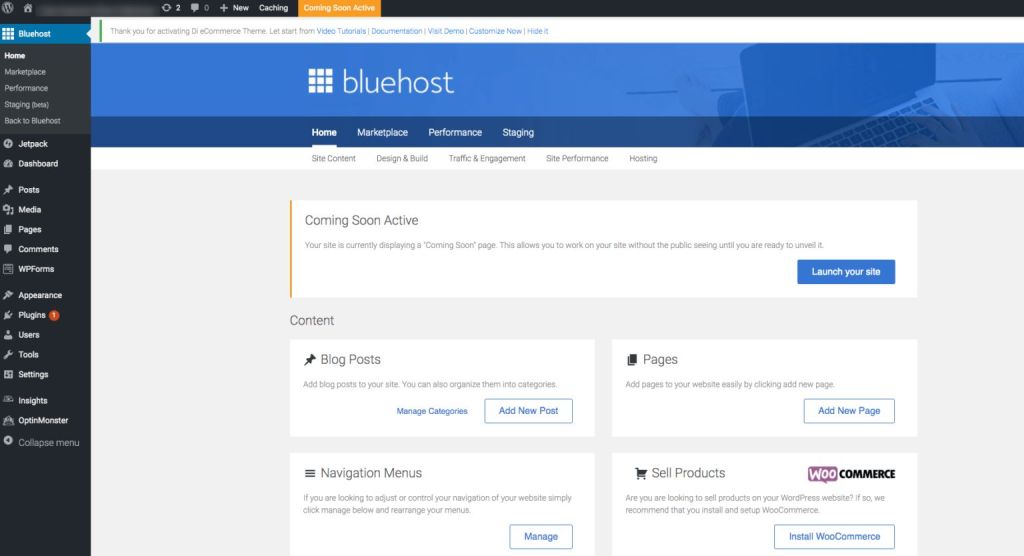
Essential WordPress Settings for a Strong Start:
Before you dive into content creation, a few foundational settings will ensure your blog is optimized from day one:
1.General Settings (Settings > General):
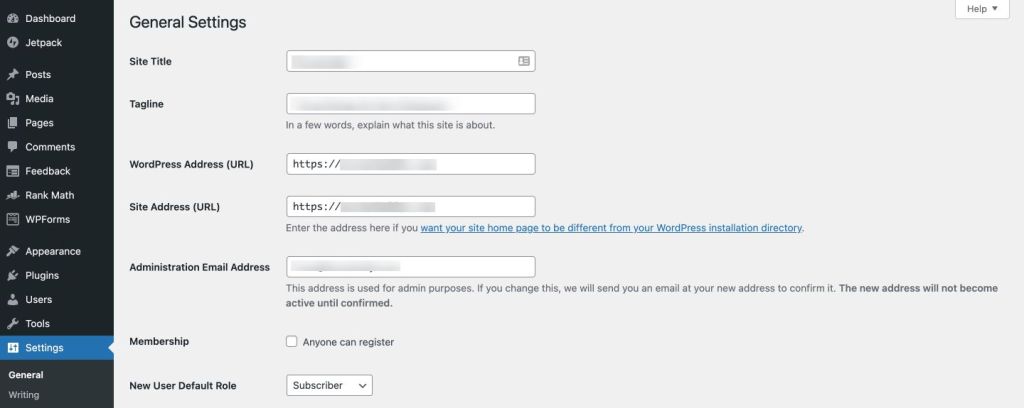
•Site Title and Tagline: Ensure these accurately reflect your blog’s brand and mission. Your tagline is a concise elevator pitch for your content. These are easily editable as your vision evolves.
•WordPress Address (URL) and Site Address (URL): Crucially, verify that both begin with https:// (not http://). This indicates your SSL certificate is active, ensuring secure connections a non-negotiable for user trust and search engine ranking in 2025. If you see http://, contact Bluehost support immediately to ensure your SSL is properly configured.
•Administration Email Address: Confirm this is an active email you regularly check, as it’s where WordPress sends important notifications.
•Membership: Unless you plan to allow user registrations, leave “Anyone can register” unchecked.
•Timezone, Date Format, and Time Format: Set these to your local preferences. This is particularly important for scheduling posts and ensuring accurate timestamps.
2.Permalink Settings (Settings > Permalinks):
•Select “Post name”: This creates clean, readable URLs (e.g., yourdomain.com/your-blog-post-title). This structure is not only user-friendly but also highly beneficial for Search Engine Optimization (SEO), making it easier for search engines to understand your content. Always click “Save Changes” after making adjustments here.
Powering Up Your Blog with Essential Plugins:
Plugins are the secret sauce of WordPress, allowing you to add sophisticated features with a few clicks. Here are a few must-haves for any new blogger in 2025:
•Yoast SEO (or Rank Math): These are indispensable for optimizing your content for search engines. They guide you through on-page SEO best practices, helping you craft titles, meta descriptions, and content that ranks higher in Google and other search engines. In 2025, with the rise of AI Overviews and more sophisticated search algorithms [1], optimizing for search intent and user experience is paramount, and these plugins are your co-pilots.
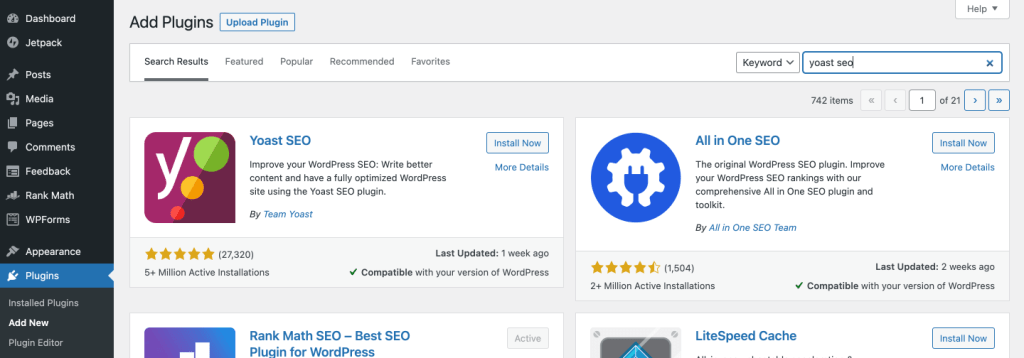
•Installation: Go to Plugins > Add New, search for “Yoast SEO” (or “Rank Math”), click “Install Now,” and then “Activate.” Most SEO plugins come with intuitive setup wizards.
•Wordfence Security (or Sucuri Security): In an increasingly digital world, protecting your blog from malicious attacks is critical. Security plugins act as your digital guardians, offering firewalls, malware scans, and login security to keep your site safe. A secure site also positively impacts your SEO.
•Contact Form 7 (or WPForms): Every professional blog needs a way for readers to connect with you. These plugins allow you to easily create customizable contact forms, ensuring your audience can reach out without revealing your personal email address.
Remember, while there are thousands of plugins available, choose wisely. Too many plugins can slow down your site, impacting user experience and SEO. Focus on quality over quantity.
Step 6: Customizing and Launching Your Blog
With WordPress installed and essential plugins in place, it’s time to infuse your blog with your unique personality. This is where design meets functionality, shaping how your audience experiences your content. The beauty of WordPress lies in its theme system, which controls your blog’s visual appeal.
Choosing and Customizing Your WordPress Theme:
Your theme dictates the layout, colors, fonts, and overall aesthetic of your blog. Think of it as the architectural blueprint of your digital home. To explore and activate themes:
•Navigate to Appearance > Themes > Add New: Here, you can browse a vast library of free themes directly from the WordPress repository. Use the search and filter options to find themes that align with your niche and vision.
•Upload a Premium Theme: If you’ve invested in a premium theme from a third-party developer, this is where you’ll upload and install it.
While there are countless options, a few themes stand out for their flexibility, performance, and beginner-friendliness:
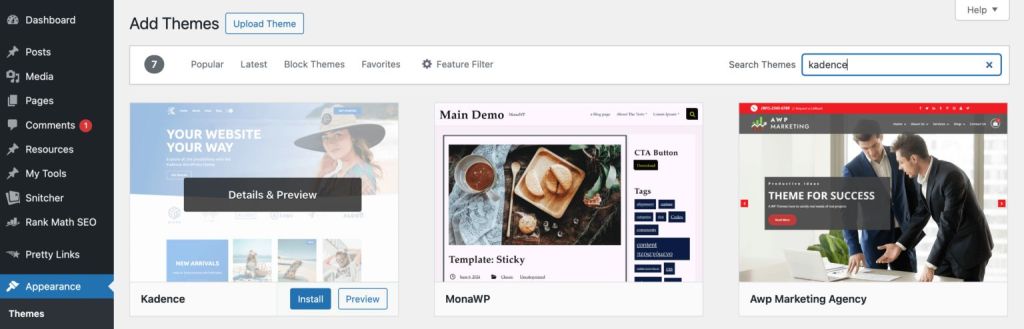
•Kadence Theme: This is a personal favorite. Kadence is a powerful, lightweight theme renowned for its speed and extensive customization options. It performs exceptionally across all devices desktops, laptops, tablets, and mobile phones ensuring a seamless user experience. The free version offers a robust feature set, more than enough for most new bloggers. For those seeking advanced design capabilities, Kadence Pro unlocks even more power. They also offer a “Lifetime Full Bundle,” a valuable investment if you plan to launch multiple blogs in the future.
•Astra Theme: Another excellent choice, Astra is a highly popular, fast, and customizable theme that offers similar features and flexibility to Kadence.
Once you’ve selected and activated your theme, head to Appearance > Customize. This is your live customizer, allowing you to make real-time adjustments to your blog’s design without touching any code. You can:
•Add your logo and create intuitive navigation menus.
•Adjust your blog’s layout, including sidebar positions and content width.
•Integrate widgets into your sidebar or footer for enhanced functionality (e.g., recent posts, social media links).
•Tweak color schemes and typography to match your brand.
It might feel a bit overwhelming initially, but take your time. Experiment with different settings, and you’ll quickly grasp the power you have to shape your blog’s appearance.
Your First Blog Post: The Genesis of Your Content Journey
Now, for the exciting part: writing your first blog post! Don’t aim for perfection; aim for progress. The most important thing is to start sharing your voice. If you’re unsure what to write, begin with something directly related to your chosen niche. Your initial posts are a learning experience, and you can always refine them later.
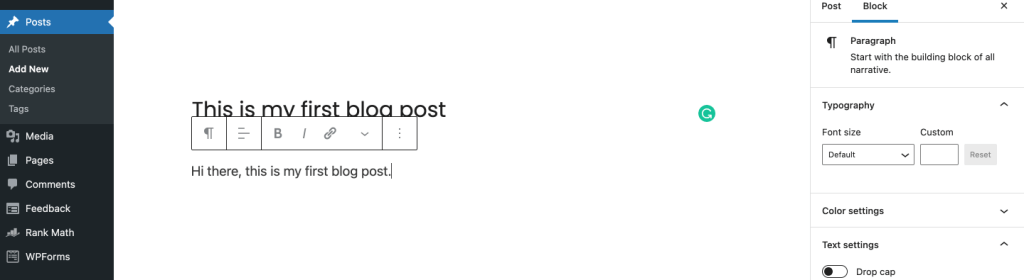
•To create a new post:
Navigate to Posts >
Add New in your WordPress dashboard. The WordPress block editor (Gutenberg) provides an intuitive interface for crafting your content, adding images, and formatting text.
Essential Pages for a Professional Blog:
Beyond your regular blog posts, certain static pages are crucial for establishing credibility, transparency, and legal compliance. To create a new page, go to Pages > Add New.
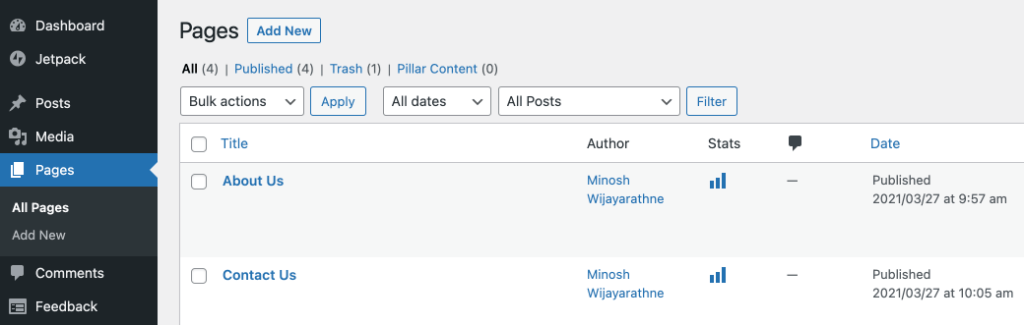
Consider including:
•About Page: Share your story, your mission, and why you’re passionate about your niche. This builds connection and trust with your audience.
•Contact Page: Provide a clear way for readers to reach you (often using the Contact Form 7 plugin).
•Disclaimer Page: If you engage in affiliate marketing or sponsored content, a disclaimer is legally important.
•Privacy Policy Page: Essential for outlining how you collect, use, and protect user data, especially with regulations like GDPR and CCPA. Tools like CookieYes can help generate compliant privacy policies.
•Terms of Service Page: Outlines the rules and guidelines for using your blog.
The Grand Reveal: Launching Your Blog
You’re almost there! Before you officially unveil your blog to the world, there’s one small but critical step: disabling Bluehost’s “coming soon” page. This page acts as a placeholder while you’re building your site, but it needs to be removed for your blog to be publicly accessible.
Here’s how:
1.Log into your WordPress Dashboard (yourblog.com/wp-admin).
2.Go to Settings > General.
3.Scroll down to find the “Bluehost Coming Soon Page” option and toggle it OFF.
4.Click “Save Changes.”
Now, open a new browser window, type in your domain name, and behold! Your brand-new blog, live and ready for the world to discover. Congratulations, you’ve successfully launched a self-hosted WordPress blog—a powerful platform for your digital journey.
What’s Next? Nurturing Your Blog for Growth and Impact
Launching your blog is a monumental first step, but the journey has just begun. The next crucial phase involves consistently creating valuable content and strategically attracting an audience. For new bloggers, the most effective approach is to write authentically, share what you know, and learn continuously.
Content is King (and Always Will Be):
•Focus on Value: Prioritize creating content that genuinely helps, informs, or entertains your target audience. In 2025, with the proliferation of AI-generated content, human-centric, insightful, and well-researched articles stand out. Quality over quantity is paramount [2].
•Embrace Your Voice: Write in a style that feels natural to you. Your unique perspective is your superpower. Experiment with different content formats long-form guides, short, punchy opinion pieces, or even interactive elements.
•Study Your Niche: Actively consume content from other successful blogs and creators in your niche. Analyze what resonates with their audience and identify gaps you can fill.
Driving Traffic to Your Blog:
While SEO is foundational, diversifying your traffic sources is key in 2025. Don’t put all your eggs in one basket.
•Search Engine Optimization (SEO): Continue to refine your SEO strategy. This includes optimizing for search intent (understanding why people are searching), leveraging long-tail keywords, and building high-quality backlinks [3]. With AI Overviews becoming more prevalent in search results, focusing on comprehensive, authoritative content that directly answers user queries is more important than ever [4].
•Social Media Promotion: Platforms like Pinterest remain incredibly powerful for driving visual traffic, especially for niches like food, DIY, and lifestyle. Consider exploring newer platforms or niche communities where your target audience congregates. Diversifying traffic sources beyond Google is a growing trend [5].
•Email List Building: Start building an email list from day one. Your email subscribers are your most loyal audience, and email marketing remains one of the most effective ways to drive repeat traffic and build a community.
Monetization: Building a Sustainable Blog:
Many new bloggers are eager to monetize immediately, but sustainable income comes from building a valuable audience first. Once you have engaged readers, monetization opportunities naturally follow.
•Affiliate Marketing: Promote products or services you genuinely use and recommend, earning a commission on sales.
•Sponsored Content: Collaborate with brands to create sponsored posts or reviews.
•Digital Products: Create and sell your own e-books, courses, templates, or other digital assets. This is predicted to be a top monetization method in 2025 [6].
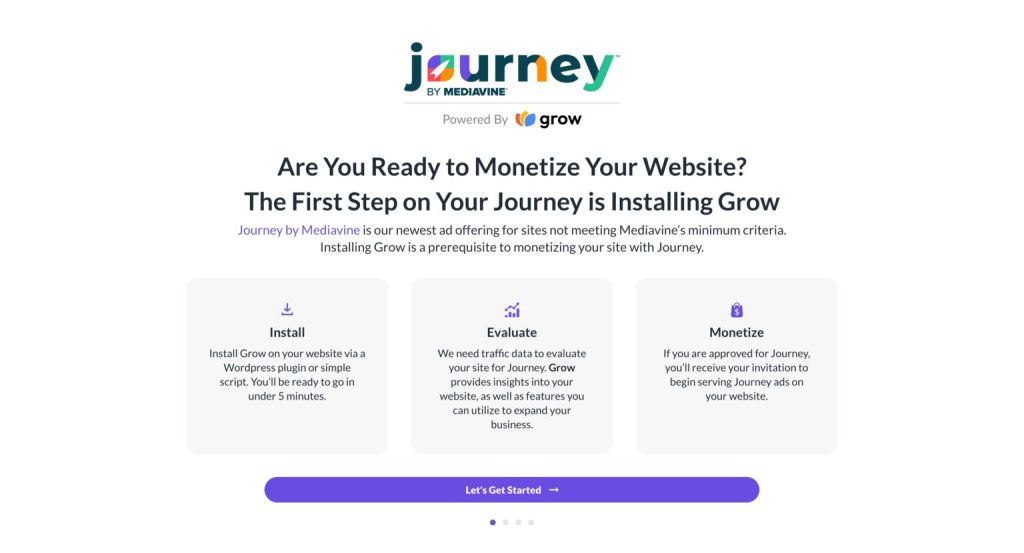
•Advertising Networks: As your traffic grows, you can join ad networks like Journey by Mediavine, which connect you with advertisers and optimize ad placements for maximum revenue. They offer a pathway to monetization even for growing blogs.
Measuring Success: Analytics and Insights:
To understand your audience and optimize your content, you need data. Fortunately, Google provides powerful free tools:
•Google Analytics: This indispensable tool allows you to track website traffic, user behavior, popular content, and much more. Setting it up is straightforward and provides invaluable insights into your blog’s performance.
•Google Search Console: This tool shows you how Google sees your blog in its search results. It helps you monitor your site’s search performance, identify indexing issues, and understand which queries are driving traffic to your content. Setting this up is crucial for any blogger serious about organic growth.
Continuous Learning and Support:
The blogging landscape is dynamic. Stay curious, keep learning, and leverage available resources:
•Bluehost Support: For any hosting-related queries, their live chat and phone support are readily available.
•WordPress Support Forums: A vibrant community of WordPress users and developers offers solutions to common issues and guidance on specific themes or plugins.
Your blog is more than just a website; it’s a platform for connection, learning, and growth. Embrace the journey, stay consistent, and enjoy the incredible experience of building your digital legacy.
Happy blogging!
![nick [Alliedify] Avatar](https://0.gravatar.com/avatar/6955a6009ff9c6a76e2eb88c263c9426c8c386b0a7637b4d0cc051871ee8c9f3?s=40&d=identicon&r=G)
 Alliedify
Leave a comment