Published: 2025 • by Nick
Love creating designs with Canva?
What if we told you your next scroll through fonts and templates could turn into actual income?
Whether you’re a casual Canva user or a seasoned designer, there are real opportunities to monetize your skills using this drag-and-drop platform. From selling digital products to launching a design service, Canva has evolved into a serious business tool in 2025.
Let’s dive into 5 clever ways you can start making money with Canva today.
Disclosure: This post may include affiliate links. If you buy through them, we may earn a small commission—at no extra cost to you.
Quick Ways to Earn with Canva
- Become a Contributor – Get paid when others use your graphics in Canva
- Sell Templates – Create plug-and-play assets for busy creators
- Offer Freelance Design Services – Monetize your skills on Fiverr or Upwork
- Design & Sell T-Shirts – Launch a mini brand via Canva’s print-on-demand
- Teach Canva – Start a blog, YouTube channel, or course for passive income
1. Join Canva as a Contributor
Best for: Designers, photographers, and illustrators
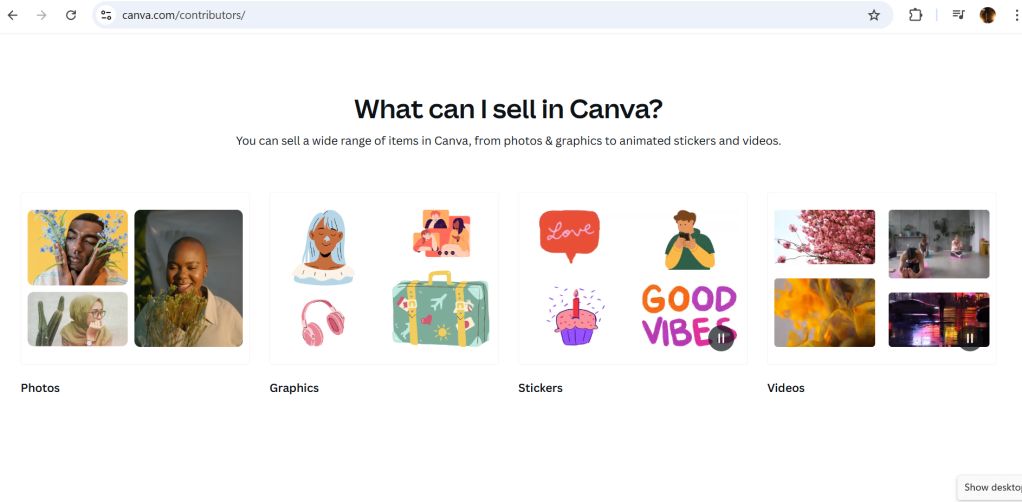
Canva allows creators to become official contributors and earn royalties from every element used in customer designs. Think icons, illustrations, stock photos, patterns, or custom graphics—anything you upload can generate recurring income.
With over 185 million monthly users, Canva’s marketplace is a global stage. The right design could be used thousands of times.
How it works:
- Apply to be a Canva Creator (free)
- Upload original, high-quality graphics or photos
- Earn every time someone uses your asset in a paid design
You retain rights to your work and Canva handles licensing, payouts, and exposure.
Pro Tip: Niche graphics—like seasonal illustrations or trending icons—tend to outperform generic designs.
2. Sell Custom Canva Templates
Best for: Bloggers, digital creators, and educators

Canva’s template market is growing rapidly. Think about Instagram carousels, Pinterest pins, eBooks, resumes, lead magnets, and business cards. Creators enjoy purchasing ready-made templates to save time and keep their designs consistent.
You can design and sell:
- Editable social media templates
- eBook & workbook designs
- Client onboarding kits
- Notion-style planners or presentation decks
Where to sell them:
- Etsy
- Gumroad
- Creative Market
- Your own website
Make sure your templates are editable for both free and Pro Canva users, and always use legally cleared fonts and graphics.
Bonus: Bundle similar designs together to boost perceived value and justify premium pricing.
3. Offer Canva-Based Design Services
Best for: Freelancers & side hustlers
Not everyone has the time (or taste) to design great visuals so why not do it for them?
Set up a freelance gig offering Canva design services. It’s one of the easiest creative side hustles to start in 2025 because:
- Canva eliminates the need for complex software
- Clients love editable deliverables
- Turnaround times are fast
Where to list your gig:
- Fiverr
- Upwork
- PeoplePerHour
- Toptal (for pros)
Popular services include:
- Instagram post design
- Branded pitch decks
- YouTube thumbnails
- Podcast covers
- Pinterest pins
Pro Tip: Use Canva’s Brand Kit to keep client colors, logos, and fonts consistent.
4. Create and Sell T-Shirt Designs
Best for: Print-on-demand entrepreneurs & artists
Yes, you can design and sell custom t-shirts using just Canva and no, you don’t need to invest in inventory.
Here’s how it works:
- Use Canva’s T-shirt templates or create your own
- Create trendy, funny, or niche-based designs
- Upload to print-on-demand platforms like Printful or Printify
- Integrate with Shopify, Etsy, or Gumroad to fulfill orders automatically
Canva even allows you to order printed merch directly through its Print Hub, streamlining local deliveries for personalized products.
Hot niches in 2025: Pet lovers, fitness quotes, astrology merch, and creator slogans.
Pro Tip: Research trending shirt topics on Google Trends or Etsy, then design accordingly.
5. Teach Canva Through Blogs or YouTube
Best for: Educators, influencers, and affiliate marketers
If you’re already a Canva power user, teaching others can be your most scalable income stream.
Start a Canva-focused blog or YouTube channel where you:
- Share design tutorials
- Break down how to monetize templates
- Review Canva tools and new features
- Recommend affiliate tools (Canva, Fiverr, Gumroad)
Add display ads, affiliate links, and digital downloads to diversify your revenue.
Example: A simple “How to make a planner in Canva” YouTube video could earn you ad revenue, affiliate income, and template sales all from one upload.
Bonus Tip: Sign up for the Canva Affiliate Program. You’ll make money whenever someone uses your link to upgrade to Canva Pro.
What About Licensing?
Before you start selling or sharing designs, it’s critical to understand Canva’s licensing terms:
- Free & Pro Assets: You can use them in commercial designs but you cannot resell them as standalone graphics or templates.
- Templates: You must add value or combine multiple elements before selling them.
- Print Use: Permitted under both Free and Pro licenses (with attribution in some cases)
Golden Rule: If you’re selling a Canva-based product, use your own assets, Canva Pro elements, or upload fully original visuals to avoid violations.
Check Canva’s full licensing policy here →
Wrapping It Up
If you’ve ever felt like your design skills were “just a hobby,” now’s the time to change that narrative.
Canva isn’t just a tool it’s a creator economy platform. From passive income through templates to active gigs and affiliate marketing, it’s never been easier to turn creativity into cash.
Whether you’re freelancing, building digital products, or launching an online store your Canva skills are a legit monetization asset in 2025.
![nick [Alliedify] Avatar](https://0.gravatar.com/avatar/6955a6009ff9c6a76e2eb88c263c9426c8c386b0a7637b4d0cc051871ee8c9f3?s=40&d=identicon&r=G)
 Alliedify
Leave a comment